Regenerate AI Chat Replies with Feedback in Swerve
See how Swerve turns feedback about repetitive or off-track AI character replies into optional regeneration directions and a way to tell us if they helped.
A character reply can be well written and still miss the moment. It might repeat an earlier reaction, forget where the scene is happening, or answer a different question from the one you asked.
Recent message feedback on Swerve brought these problems into focus. People reported misunderstood intentions, repetitive responses, forgotten story details, replies that felt too short, and characters drifting away from their established personality. Those reports helped us identify what people wanted to change when trying another reply.
We have updated reply regeneration in supported one-on-one character chats. You can add an optional direction, use a suggestion, or regenerate without writing anything extra. After a dislike, you can use that feedback to try another version, then tell us whether it helped.
What was missing after a dislike
Sending feedback and getting back into the story were separate tasks. You could report an unsatisfying reply, but the next step was less clear. Tapping regenerate also left an important question unanswered: what should change this time?
A request for more detail is different from a request to stop repeating an action. A character that forgot the current scene needs a different correction from one that made a choice on your behalf.
We wanted the next attempt to reflect the problem you reported, while keeping the feedback itself available for follow-up. You should not have to write a better prompt every time a reply goes wrong.
Give the next reply a direction, if you want
Open Regenerate on an eligible character reply. The confirmation panel puts an optional direction first, with a short menu of suggestions underneath.
You can ask it to:
- follow the current story;
- try a different response;
- respond to your intent;
- expand the reply;
- stay in character;
- leave your choices to you.
When the reply has feedback, relevant suggestions appear first. Choosing one fills the direction field with editable text. You can adjust it, write your own direction, or leave the field empty.
For example, if a conversation has already moved into a café but the character returns to an earlier scene, a direction could be:
Continue from the café scene. Keep the events we have already established, and leave my next action for me to choose.
The extra direction applies to this regeneration. It does not rewrite your saved Persona or change the character card. Those describe more lasting details; if you are setting them up for the first time, see our AI chat Persona guide.
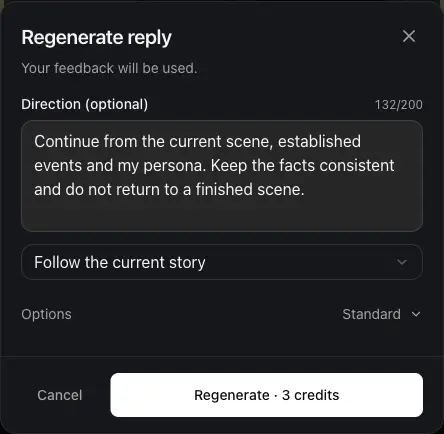
Reply length and the current reply preview are available under Options. The confirm button shows the credit cost for the selected chat model. Opening the panel or choosing a suggestion does not start generation; you decide whether to confirm.
Turn a dislike into a chance to recover
After you submit feedback, Swerve asks whether you want to regenerate using it. You can continue into the confirmation panel or choose Not now.
Your report stays saved either way. Taking another attempt does not withdraw the original feedback, and the optional direction does not replace the explanation you already submitted.
This gives you a way to keep the conversation moving while still telling us what went wrong. You can report a problem without having to regenerate, too.
Tell us whether the new reply helped
When a regeneration linked to feedback finishes and the new reply is shown, a small translucent card appears beneath it: Did this fix the issue?
Choose Resolved if it did, Still an issue if it did not, or close the card to skip. The card stays out of the way so you can keep chatting.
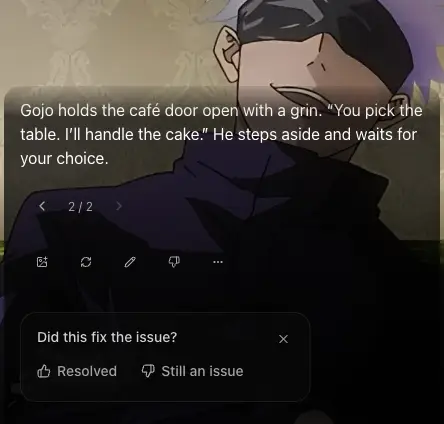
Choosing Still an issue opens feedback for the new reply with the earlier reasons selected, ready for you to review and submit. You can change them or cancel. It does not send another dislike automatically.
A completed generation tells us a new reply was delivered. Your answer tells us whether it addressed the problem. Skipping the card or continuing the story is not counted as confirmation that the issue was resolved.
Questions about regenerating AI character replies
Do I have to explain how to improve the reply?
No. The direction field is optional. You can regenerate without extra instructions, or submit feedback and leave it there.
Is regeneration after a dislike free?
Regeneration follows the current chat model's credit rules. Check the cost on the confirmation button before starting. Submitting a dislike does not automatically start a paid request.
Will every regenerated reply show a feedback card?
The card belongs to a regeneration associated with a submitted dislike. That includes manually regenerating a reply you have already disliked. Ordinary replies and regenerations without linked feedback do not show this question.
Does a new version mean the problem is fixed?
A new version is another attempt. If it still repeats itself, loses the scene, or feels wrong for the character, tell us. Your feedback remains useful even when a suggestion does not produce the result you wanted.
Return to your character chats to try a different reply, or read the latest Swerve updates.
Author

Categories
More Posts
Turn Your Nilaio Story into Scene Images and Videos
Create images from saved chat messages, animate them into silent short videos, and manage automatic generation, media credits, and private chat backgrounds.
Get to Know Your Character Through Diaries in Nilaio
Learn where to find character diaries, when new entries become available, how free and paid reading work, and what we plan to improve next.
How Companion Levels and Gifts Work in Nilaio
Understand companion EXP, level milestones, character diaries, gifts, and how Nilaio plans to develop deeper character interactions over time.